Purchase and download for immediate use; 30 day money back guarantee: click here
For Excel 2000, 2002, 2003, 2007 and 2010
Overview of SPC for Excel
Statistical Tools in SPC for Excel
User Support
Upgrades
Demo
System Requirements
Customer Feedback
Software Videos
Ordering Information
Overview of SPC for Excel
SPC for Excel provides an easy way to perform statistical analysis in Microsoft Excel. This SPC software is very cost effective and user-friendly. At the same time, it is a very powerful statistical package that meets the needs of most professionals - green belts, black belts, quality professionals, quality assurance, front-line personnel, supervisors, quality control, controllers, engineers, and laboratory personnel - anyone who wants to improve their data analysis.
At only $159 (or $89 for upgrade from version 3) for a single user with discounts for multiple users, SPC for Excel is an attractive alternative for many organizations. It is the perfect tool to use for statistical training. Our SPC software is used internationally in over 50 countries. Plus, you will receive regular revisions with no maintenance fees!
The statistical tools and options in the software are listed below. More details on the various tools are given on the individual pages through the links below or by selecting Features under the SPC for Excel software link on the left.
Statistical Tools in SPC for Excel
- Pareto diagrams
- With or without cumulative percentage lines
- Four different ways to enter the data
- Ability to automatically determine categories and frequencies
- Histograms
- Easily change the number of classes
- Show/hide the frequency distribution
- Add descriptive statistics if desired
- Attribute Control Charts
- p charts
- np charts
- c charts
- u charts
- Chart selector tool
- Variable Control Charts
- Xbar-R charts
- Xbar-s charts
- Moving average & moving range charts
- Individual charts
- Run charts
- Ability to make subgroups of any size from a column of data
- Ability to make multiple individuals charts at once (view video)
- Option to display Xbar chart only, Xbar and range charts on separate sheets, or Xbar and range chart on same sheet
- Automatic checking for trends and option for trend control chart
- Chart selector tool
- Control Chart Options
- Select tests for out of control: points beyond the limits, seven in a row trending up, zone A, zone B, zone C, mixture, stratification
- Prevent values below zero on the chart
- Add a target line to the chart
- Option to automatically update control limits
- Change the control limits from +/- 3 sigma or enter own limits
- Control Chart Options for Completed Charts
- Update one chart or all charts with one click
- Recall input form to change options
- Split control limits
- Start chart at a new point
- Remove a point from the calculations
- Add comments to a point
- Remove all points beyond the control limits from the calculation
- Select range on which to base control limits
- Process Capability
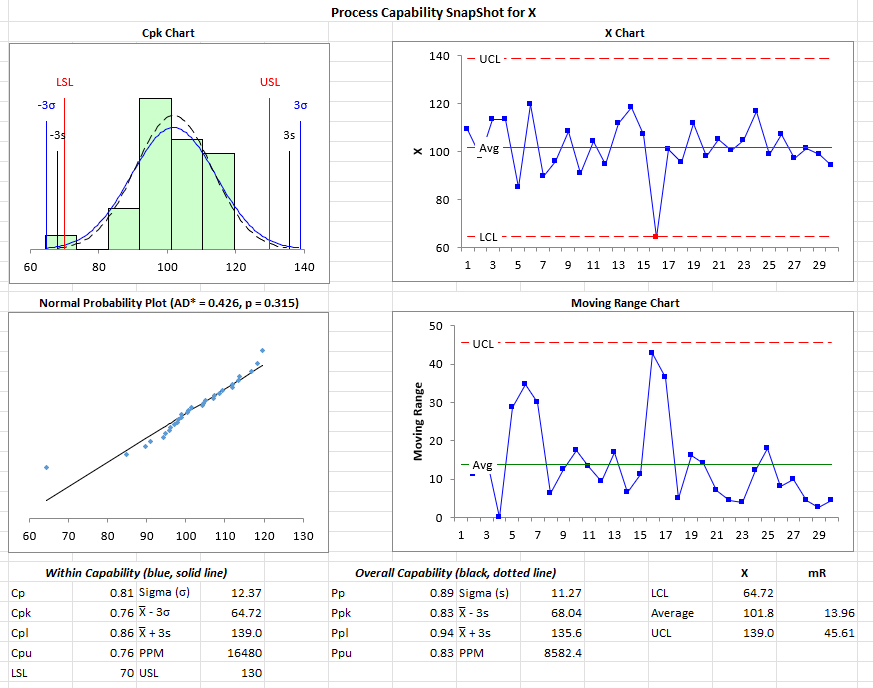
- Cp, Cpk, Pp, and Ppk
- % out of specifications
- Normal curve on top of histogram with USL, LSL and nominal
- One-side specification limits
- Descriptive statistics
- Removal of outliers
- Ability to make multiple process capability charts at once
- Ability to set specification limits based on data
- Option to add +/- 3 sigma limits to the chart
- Scatter Diagrams
- Option to fit linear, logarithmic, polynomial, power or exponential
- With or without regression line on chart
- Ability to add labels to each point
- Measurement Systems Analysis
- Average and Range Method to generate the classical Gage R&R report with the following chart options:
- Averages charts - stacked and unstacked
- Range charts - stacked and unstacked
- Run chart by part
- Scatter plots
- Whiskers charts
- Error charts
- Normalized histograms
- X-Y Plots
- Range charts for each operator
- Operator bias chart
- Operator consistency chart
- ANOVA Method that includes:
- ANOVA table
- Residuals plot
- ANOVA Gage R&R report
- Range Method for Gage R&R
- Bias Method: Independent Sample Method, Bias Method and Control Chart Method
- Linearity Method
- Attribute Gage R&R that includes:
- Effectiveness table (attribute Gage R&R report)
- Cross-tabulations
- Kappa values
- Cause and Effect Diagrams
- Easily add items to the diagram
- Transfer Charts to Word and PowerPoint
- Easily move charts to these other applications with one click
- Multiple Linear Regression
- ANOVA for Model
- Coefficients output: estimates, standard error, t statistic, p values, 95% confidence limit, VIF, standardized coefficients
- Regression statistics: R, R square, adjusted R square, mean, standard error, coefficient of variation, Durbin-Watson statistics, PRESS, R square prediction
- Residuals analysis: residuals, leverage, standardized residuals, internally studentized residuals, externally studentized residuals, DFFITS, Cook's distance, standard error of estimated mean, 95% confidence limits
- Residuals charts: normal plot, versus predicted values, versus observation number, versus predictor variables
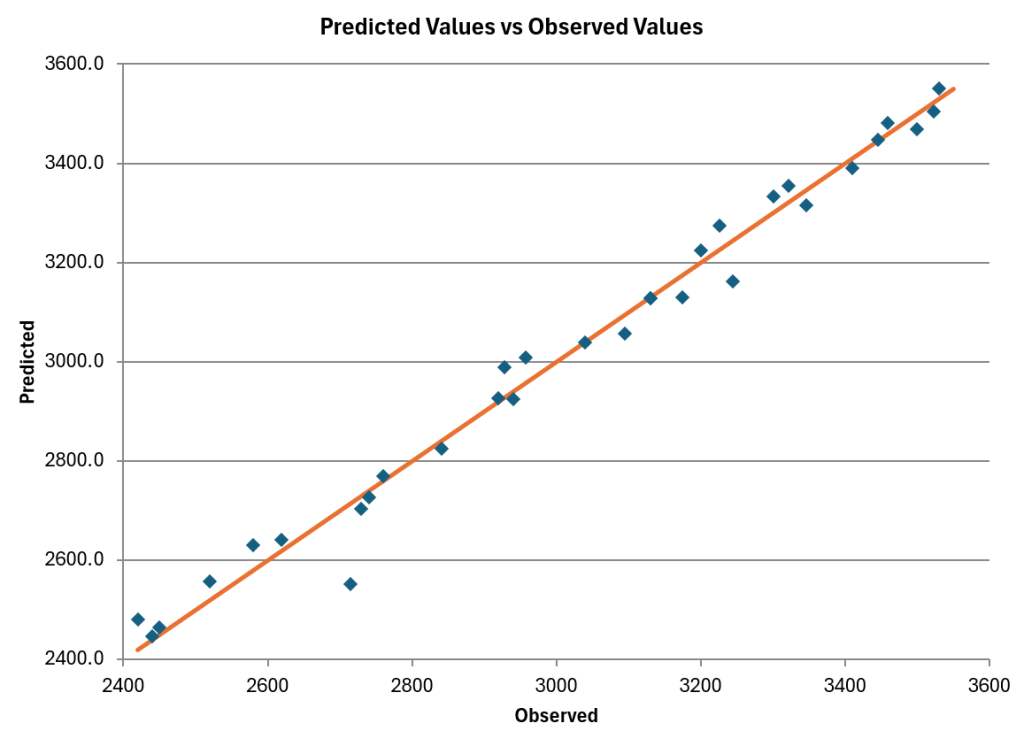
- Other charts: predicted vs actual; DFFITS, Cook's distance and leverage versus observation number
- Remove variables and observations easily
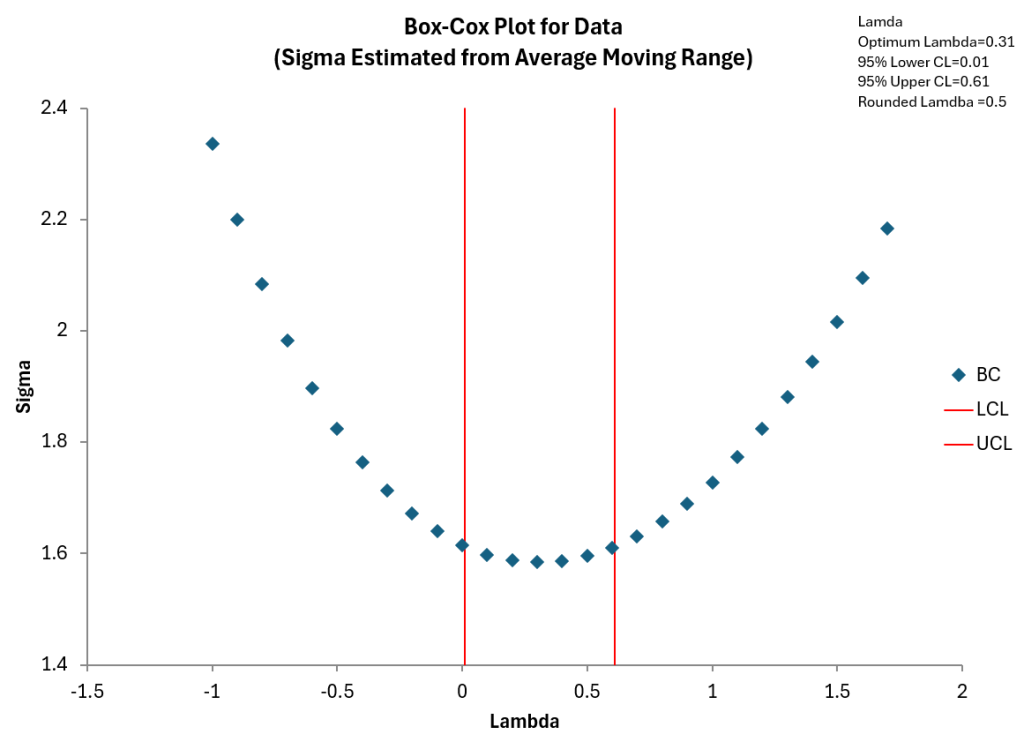
- Transform y variables
- Experimental Design
- Full Factorials
- Fractional Factorials
- Plackett- Burman
- Design table analysis
- ANOVA Table for Factors and Interactions
- ANOVA for model
- Design statistics: average, standard deviation, coefficient of variation, R square, adjusted R square, PRESS, R Square prediction
- Normal and half-normal plot of effects
- Effects and two factor charts
- Residuals analysis: residuals, leverage, standardized residuals, internally studentized residuals, externally studentized residuals, DFFITS, Cook's distance
- Residuals charts: normal plot, versus predicted values, versus actual run number
- Other charts: predicted vs actual; DFFITS, Cook's distance and leverage versus actual run number
- DOE optimization chart
- Easily select effects to include/exclude in the analysis
- ANOVA
- 1 to 5 factors
- Crossed, nested and mixed designs
- Fixed and random factors
- ANOVA for Model and Factors
- Variabililty Charts
- Components of Variance Chart
- Expected Mean Squares
- Statistics: average, standard deviation, coefficient of variation, R square, adjusted R square, PRESS, R square prediction
- Treatment: means, standard errors, 95% coefficient limit
- Residuals analysis: residuals, leverage, standardized residuals, internally studentized residuals, externally studentized residuals, DFFITS, Cook's distance
- Residuals charts: normal plot, versus predicted values, versus actual run number
- Other charts: predicted vs actual; DFFITS, Cook's distance and leverage versus actual run number
- Options to compare treatment means: Tukey's method, Bonferroni's method, Fisher's LSD method (all with plots of 95% confidence intervals)
- Single/Two Sample Tests
- Descriptive Statistics: mean, standard error, median, mode, standard deviation, sample variance, kurtosis, skewness, range, minimum, maximum, sum, and count for a set of data
- One sample t and z hypothesis test and confidence interval for mean
- One variance hypothesis test and confidence interval
- Two sample t and z hypothesis test and confidence interval for difference in means
- t test for paired samples
- One proportion test
- Two proportion test
- Sample size calculator
- Multiple Mean Comparisons
- Fisher's LSD Method
- Tukey's Method
- Bonferroni's Method
- Analysis of Means
- Box and Whisker Plots
- Multiple Variance Comparison
- Bartlett's Test
- Modified Levene's Test
- Waterfall Charts
- Correlation Coefficients
- Failure Mode and Effects Analysis Template
- Plot Multiple Y Value Against One X Value
- Scatter Plot Matrix
- Normal Probability Plot with Anderson-Darling Statistic
- Distributions
- 3 discrete, 6 continuous - includes distribution chart, shaded areas, ability to change parameters and update distribution charts, % above, below, etc. included
- Side-by-Side Histogram
- Chi Square Goodness of Fit
- Chi Square Test for Association
- Nonparametric Tests
- One Sample Sign Test
- One Sample Wilcoxon Test
- Mann-Whitney Test for Two Samples
- Kruksal-Wallis Test for Multiple Samples
User Support
User support is provided directly by us. This includes the person who developed and upgrades the software and knows it inside and out. We will provide the answers you need to effectively use the program - all at no cost.
Upgrades
Enhancements to the program are done on a regular basis - often from suggestions from users. Want the software to do something else? Simply ask. In many cases, it can be done and done quickly. Revisions between major upgrades are available at no cost. There are no maintenance fees.
Demo
The demo is a full-working version of the program that you can use for 10 days. The videos available here on the website provide a great way of seeing how the software works. The demo allows you to try the software using your own data.
Demo info
System Requirements
The software will run on any PC that will run Excel. Excel 2000 through Excel 2010 are supported.
Customer Feedback
Our customers often give us feedback on how easy the program is to use and the great value that it delivers. Click here to see some of our customer testimonials.
Software Videos
There are over 30 videos on the website that demonstrate how the software works. These videos are a great way to see how the program works. Click here to access these videos.
Ordering Information
The cost of the software for a single user (one computer) is only $159. You can order SPC for Excel on-line using a credit card (Visa, MasterCard, Discover or American Express) or a purchase order number. With a credit card, you can download the software immediately! For pricing for multiple users, please contact us or click below to see our price discounts for multiple users. We offer a 30 day money-back guarantee.
How to Order